Windows Server Storage Spaces
New Brunswick Community College · Moncton, Canada · Academic work, 2023–2025
1. Project overview
Guest storage-pool and volume administration on Azure-hosted Windows Server.
2. Objective
Connect data disks to storage pools and verify volume state without assuming resilience.
3. Environment and technologies
Windows Server 2022; Server Manager; Disk Management; PowerShell; Azure disks; Storage Spaces.
4. Architecture
Azure data disks → guest pool → virtual disk → NTFS volume. Manual and PowerShell tasks have different capacities and must not be combined.
5. Technical implementation
- The original manual task specifies two 32 GiB disks, a fixed Simple virtual disk and a 62 GB Z: NTFS partition.
- An inspected pool image shows two 32 GB disks and a 63 GB pool; the volume image shows 61.98 GB Z:, Online and Healthy.
- A separate Run Command image shows pool commands and Windows Server 2022 output; the roughly 2 TB PowerShell task is distinct.
- Check GPT/disk initialization and final virtual-disk layout separately. A healthy volume does not establish fault tolerance.
6. Configuration examples
First command observed; truncated creation command is not reconstructed. Final-state checks are illustrative.
# Actual command visible in the source image:
Get-PhysicalDisk -CanPool $true
# New-StoragePool is partly clipped; it is not reconstructed here.
# Illustrative final-state checks:
Get-StoragePool
Get-VirtualDisk
Get-Volume -DriveLetter Z
Get-Disk | Select-Object Number, PartitionStyle, OperationalStatus
7. Security considerations
A Simple layout has no disk fault tolerance. Verify selected disks and backups; no failure/recovery test is claimed.
8. Troubleshooting
The image submitted for the virtual-disk prompt is an Azure managed-disk blade, not guest virtual-disk proof. The separate Z: image supports the volume state.
9. Verified result
Disk Management shows a healthy 61.98 GB NTFS Z: volume. Storage Run Command shows completion. Exact Simple virtual-disk settings, GPT and resilience remain incompletely verified.
10. Original evidence
Cloud III Lab Activity - administering virtual machines compl.docx, images 13/15/19 inspected. Images 15/19 shown; the subscription-ID image is omitted.
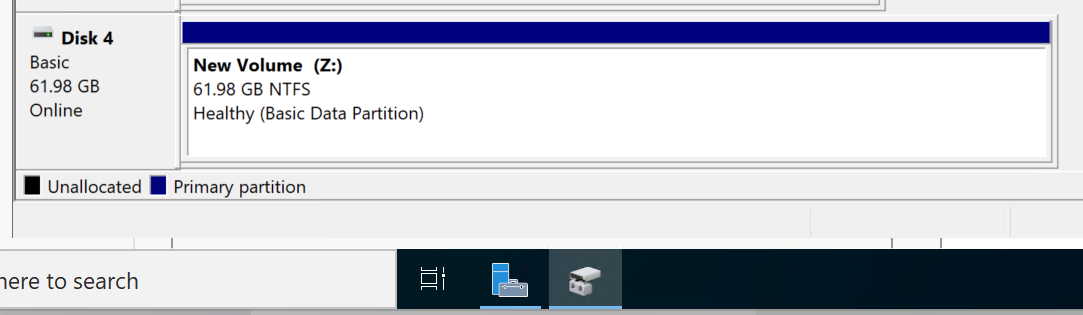
Disk Management shows a 61.98 GB NTFS Z: volume, Online and Healthy. Resilience and recovery are not established.
Open original screenshot ↗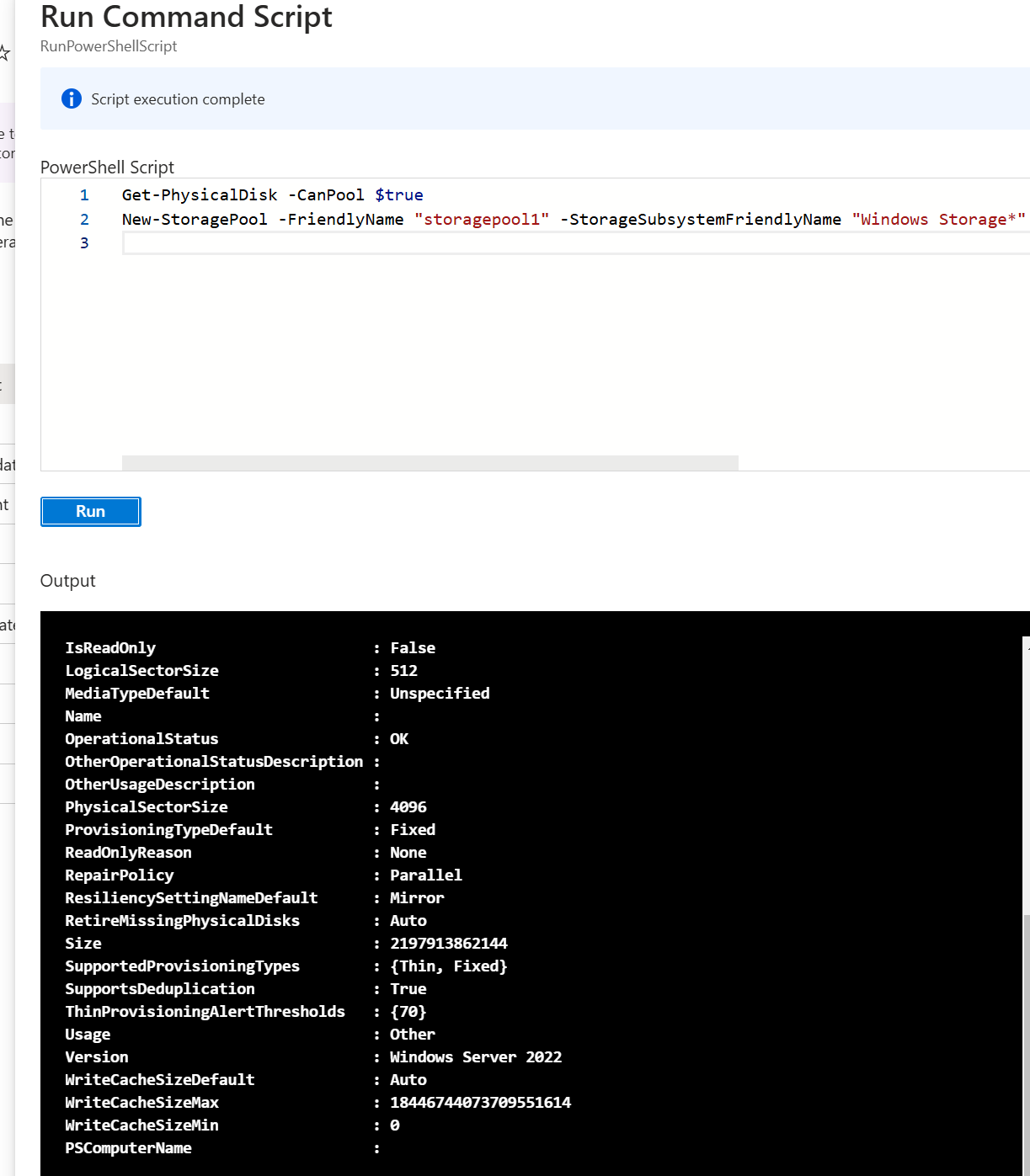
Run Command shows storage commands, script completion and Windows Server 2022 output. The final virtual-disk layout is not independently established.
Open original screenshot ↗Evidence register · Recovered commands are owner-supplied history. Illustrative examples are not claimed execution.
Relevant practice for Network Administrator, IT Support, Linux System Administrator, Cloud Support and IT Operations roles. Academic scope and observed results are stated separately.