Azure-hosted IIS Deployment
Architecture and implementation
Academic Azure-hosted Windows Server: provisioning, guest IIS installation and HTTP access are separate steps. Run Command success does not prove Custom Script Extension success.
Illustrative verification commands — not recovered output:
Get-WindowsFeature Web-Server
Get-Service W3SVC
Invoke-WebRequest http://localhost -UseBasicParsing
Security and troubleshooting: inspect NSGs, guest firewall, feature state, W3SVC and HTTP response separately. Original evidence and bounded outcomes are preserved below.
Azure VM Extensions and IIS
Objective
Automate web-server setup after VM provisioning.
Technologies
Azure PowerShell · VM extensions · Windows Server · IIS
Configuration summary
A Custom Script Extension workflow uses PowerShell to install/configure IIS on an Azure-hosted Windows VM.
Troubleshooting
Check extension status, script execution, guest firewall rules and NSG HTTP access independently.
Evidence and results
The original Run Command screenshot shows IIS feature installation succeeded. A separately reviewed original screenshot shows the IIS welcome page over HTTP. The installation evidence uses Run Command, so it does not establish that the Custom Script Extension workflow passed independently.
Screenshot evidence
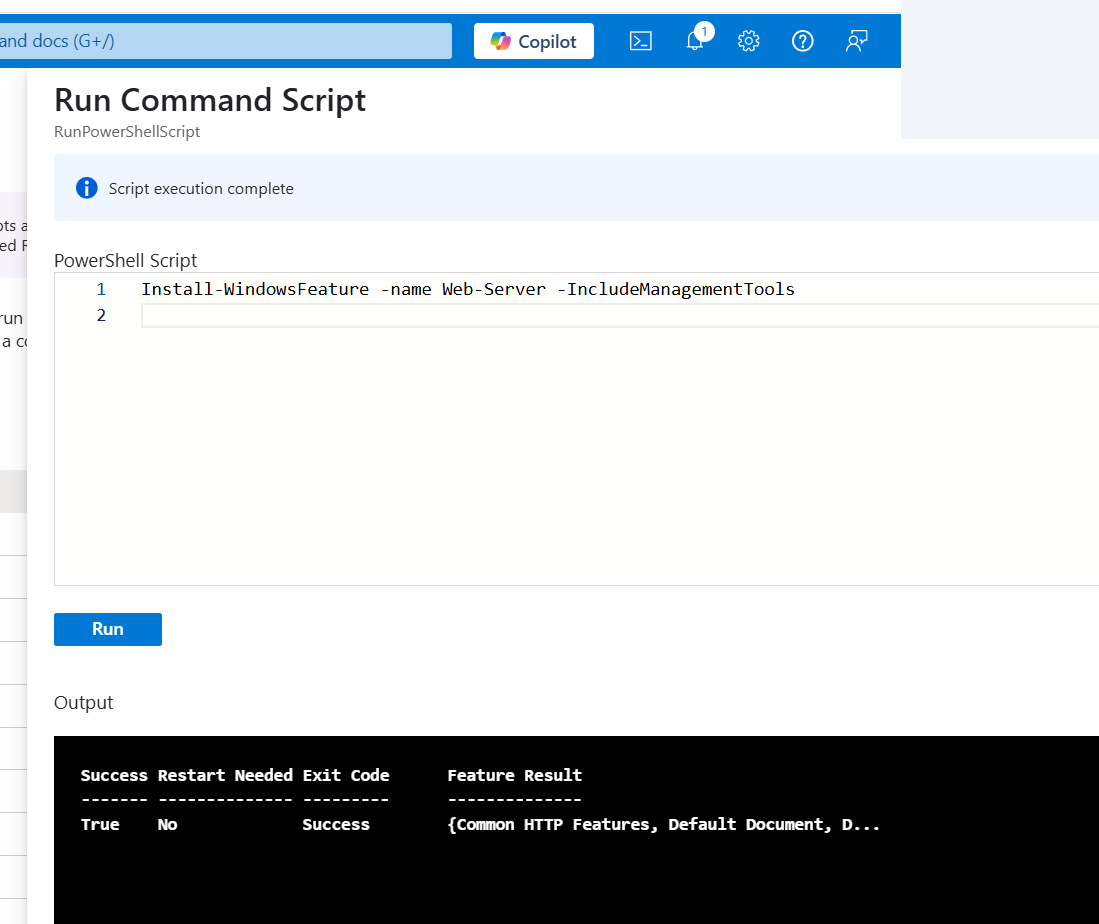
Run Command shows Install-WindowsFeature for Web-Server with Success=True and a successful exit status.
Open full size ↗